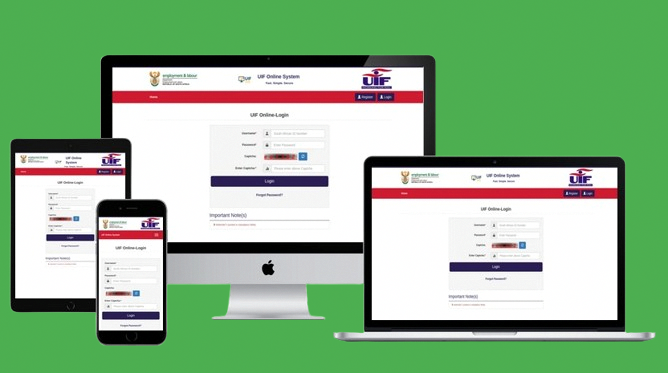
Trying to log into UIF (uFiling)? 🚀 This guide helps you access your account securely, avoid fake websites, and fix login issues. Many people lose money because of UIF scams — so it’s important to follow trusted, official steps only.
Before we continue, please note: MyInfoHub is an independent information site. We do not process UIF payments, claims, or applications.
UIF Login – Direct & Safe Method
You can log in to UIF using the official uFiling portal. Follow these steps:
- Open your browser and go to the official UIF uFiling website.
- Click on the “Login” button.
- Enter your South African ID number and password.
- Complete the security check.
- Click “Sign In”.
Once logged in, you can track UIF claims, view payments, upload documents, or update details. 👍
⚠️ Beware of UIF Login Scams
Fraudsters often create fake UIF login pages to steal personal information. Protect yourself by following these rules:
- Never enter your UIF details on WhatsApp links.
- Do NOT use Google Ads (many fake sites appear there).
- Avoid “agents” who promise faster payouts for a fee.
- Never share your ID number or password with strangers.
- Always type the website address manually.
You should only login using the official portal — no other system processes UIF claims.
How to Register for a UIF uFiling Account
If you don’t have an account yet:
- Visit the official uFiling website.
- Select “Register”.
- Enter your ID number, email, and phone number.
- Verify your details via SMS.
- Create a secure password.
Registration takes 2–5 minutes and gives you full access to UIF services online.
Forgot Your UIF Password?
You can reset it easily.
- Go to the uFiling login page.
- Click “Forgot Password”.
- Enter your ID number.
- Choose SMS or Email verification.
- Create a new password.
If the reset fails, your number or email may be outdated — you must update it at a Labour Centre.
How to Fix UIF Login Problems
1. “Your account is blocked”
This happens after too many wrong password attempts. Wait 24 hours or reset your password.
2. “ID number not found”
Your employer may not have declared your details. Visit a Labour Centre to verify your record.
3. Incorrect phone number for OTP
You must update your number manually at a Labour Centre.
4. System error or loading forever
This usually means uFiling is down due to high traffic. Try again later.
What You Can Do After Logging Into UIF
- Check UIF claim status
- View expected payout dates
- Upload supporting documents
- Submit continuation of payment
- Check employer declarations
Internal & External Links
How Long Does UIF Take to Payout
FAQ
Is uFiling free to use?
Yes, UIF online services are completely free.
Can someone log in for me?
No, never share your password — scammers often pretend to be “helpers”.
Why does UIF ask me to verify my details?
It’s a security measure to prevent identity theft and fraudulent claims.
You May Also Like:
- UIF Login Guide (2025) — How to Access uFiling Safely
- How Long Does UIF Take to Pay Out? (2025 Guide) ⏳
- Does UIF Money Expire If Not Claimed in South Africa? (2025 Guide) 💼⏳
- Farming Grants in South Africa (2025)
- Small Business Grants in South Africa (2025)
- SEFA Loans in South Africa 2025
- SEDA Advisory South Africa – Business Registration & Training (2025)
- DTIC Funding & Incentives in South Africa (2025)
Disclaimer
MyInfoHub is not affiliated with UIF, uFiling, or the Department of Employment and Labour. All information is for educational purposes. Always use official government platforms for applications, login, and updates.